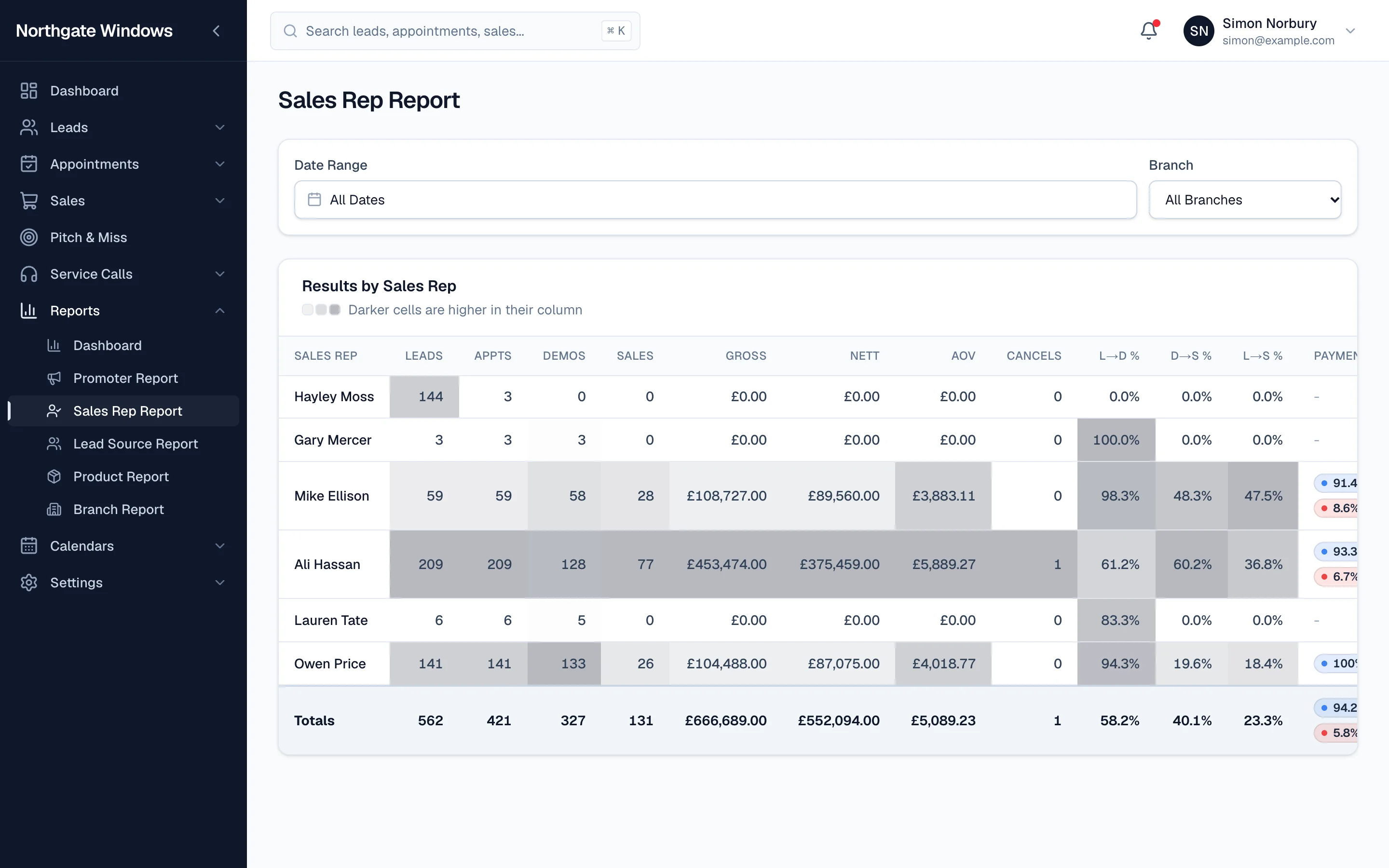
Your sales manager shouldn't need to ring round the reps to know how the month's going. The Sales Rep Report puts it all on one screen.
What's in it
For every rep over the dates you choose:
- leads, appointments and demos
- sales, gross, nett and average order value
- cancellations
- lead-to-demo, demo-to-sale and lead-to-sale conversion
- how their sales split across payment methods
Darker cells are higher in their column, so the best (and worst) performers jump out without anyone squinting at numbers.
What to look for
- High demos, low sales: the rep's getting in the door but not closing. Time for some ride-alongs.
- Low lead-to-demo: appointments are being lost before the rep even sits down — check whether the leads they're given are confirmed properly.
- High cancellations: sales are being written that don't stick.
- Low average order value: the rep might be selling the minimum rather than the whole house.
Make it a habit
The most successful companies we work with look at this report every week, not every quarter. Small problems are easy to fix; big ones are expensive.